Last time I showed you my seven-rule system. This time you watch it work.
I need a simple app to use as an example, and I was hungry, so obviously decided on a lunch decision tool.
The problem: my team wastes time debating where to eat.
The solution: let a computer pick, based on who’s eating, dietary requirements, and where we’ve been recently.
Simple, right? Except most people would just start coding. Open Cursor. Tell the AI “build me a lunch picker app.” Watch it hallucinate something that works for five minutes then falls apart.
This isn’t that. This is what happens when you force the AI to think before it types.
The Starting Point
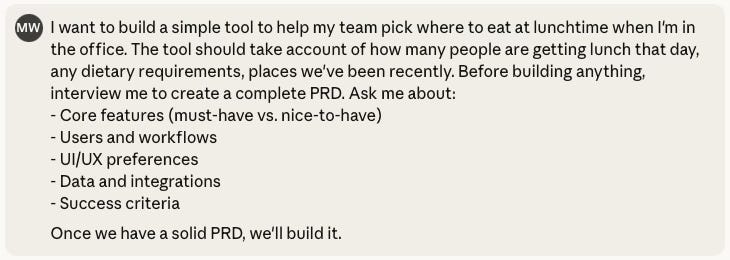
I didn’t start with a comprehensive PRD. I started with this:
Eight sentences. Vague requirements. No technical details. No user stories. No data models.
This is how most product ideas start. You know the problem. You have a rough sense of the solution. The details? Completely fuzzy.
So I let Claude interview me. Not because I’m lazy (okay, partly because I’m lazy), but because I genuinely didn’t have all the answers.
Claude interviewed me. Questions came in batches covering different aspects of the product:
Core Features:
Q: What’s the absolute minimum this tool needs to do?
A: Provide a list of local places to eat. They don’t have to be restaurants—could be a good sandwich place. Basic flow: identify where you are, suggest places within a certain radius or walk time, then filter by food type, establishment type, distance.
Q: Should people vote on suggestions, or does the tool just make one recommendation?
A: Show multiple ranked options. The next complexity layer lets people express interest in getting lunch together, dictate criteria, then vote on the filtered results.
Q: What counts as “recently”? And dietary requirements—just basics or specific allergies?
A: Recently means within the last week or two. Track vegetarian/vegan and dietary requirements. Someone gluten-free can’t eat at a pasta place, for example.
Users and Workflow:
Q: Who inputs the information each day?
A: Ideally everyone inputs their own information. Maintaining their own profile means the information is stored and removes the need to re-key it.
Q: When does this happen? How many people on an average day?
A: Could happen any point up until people leave, but realistically an hour or two before lunch.
Q: Do people need accounts?
A: One person could run it, but accounts would make it easier to maintain preferences and dietary requirements.
UI/UX:
Q: Where do you want to access this?
A: Desktop browser and mobile. Longer term, WhatsApp or Slack integration would be cool, but those are longer-term ideas.
Q: Quick and minimal, or more detail like menus and prices?
A: Start with quick and minimal, but with the ambition to add more detail.
Data and Integrations:
Q: Do you have a list of restaurants, or should the tool build one?
A: Pull from Google Places, TripAdvisor, OpenTable, etc.
Q: Live data or static list?
A: Opening hours will probably be important, but once a local list is established the data could be cached.
Success Criteria:
Q: What does “working well” look like?
A: Stop the “where should we go?” conversation, but perhaps also surprise us with new places we hadn’t considered.
Q: How will you know if people find it useful?
A: Usefulness should be obvious by how often people use it.
Notice what happened here. I started with “help my team pick lunch.” Claude asked structured questions. My answers revealed I hadn’t actually thought this through.
Some answers were confident (”Track vegetarian/vegan and dietary requirements”). Some were aspirational (”Longer term, WhatsApp or Slack integration would be cool”—translation: not building that soon). Some made me realize I was thinking in layers (”Start quick and minimal”—because I know myself, and if I try to build everything at once, I’ll build nothing).
Here’s the thing: I didn’t have everything figured out. I was making product decisions while typing. That’s not a bug. That’s the whole point.
You don’t need all the answers before you start. You need enough to document something. The questions help you discover what you don’t know. Then the AI helps you structure what you do know into something buildable.
After 15 minutes, Claude generated the PRD. Ten pages. Three development phases. Users, workflows, data models, success metrics. Everything a product manager should document before building.
Here’s an excerpt:
# Product Requirements Document: Lunch Decision Tool

## Purpose
Help office teams pick where to eat lunch by suggesting nearby options
filtered by group preferences, dietary requirements, and recent visit
history.

## Core Problem
Teams waste time debating lunch options. The tool should eliminate that
friction whilst occasionally surfacing new places people haven’t tried.

## Phase 1: MVP (Quick & Minimal)

### Must-Have Features
- Detect user’s current location or let them set office location
- Pull nearby food options from Google Places API
- Filter by food type, establishment type, distance
- Simple user accounts with dietary requirements
- Create a “lunch group” and see who’s joining
- Aggregate dietary requirements automatically

### Nice-to-Have (Phase 1)
- Vote on top 3-5 options
- Show quick decision or results
The PRD is comprehensive. But it’s written for humans. Written to communicate vision, justify decisions, explain trade-offs.
AIs need something different. They need focused instructions. Specific tasks. Clear dependencies. Single-purpose documents they can reference without wading through context.
That transformation is what the Implementation Plan Generator does. But first, I need to set up the workspace.
Setting Up Cursor
I open Cursor. Create a new project. Name the folder lunch-chooser.
Two folders get created immediately:
lunch-chooser/
├── docs/
└── .cursor/
    └── rules/
The docs folder holds all project documentation. The .cursor/rules folder holds the seven rules that constrain AI behaviour.
I drop my seven rule files into the rules folder:
implementation-plan-generator.mdc
core-development-workflow.mdc
ui-implementation.mdc
bug-tracking.mdc
bug-squash-protocol.mdc
terminal-safety.mdc
documentation-reference.mdc
Then I drop lunch-tool-prd.md into the docs folder.
That’s it. The workspace is ready. Cursor can now see the PRD and knows which rules to follow.
Running the Generator
I open a new chat in Cursor (Agent mode, not Plan mode) and the prompt is simple:
That’s it. One sentence. Two file references using Cursor’s @ syntax.
The rule activates. The AI reads the entire PRD. It doesn’t skim. The rule forces thorough analysis before generating anything.
I watch it think. Two minutes pass.
Then my docs folder explodes.
The Explosion
Before: one file
After: 27 files across seven directories
My docs folder just had a baby. Or maybe triplets. Here’s what appeared:
docs/
├── lunch-tool-prd.md (original)
├── implementation.md
├── project_structure.md
├── uiux_doc.md
├── data_model.md
├── api_specifications.md
├── backend/
│   ├── api_endpoints/
│   │   ├── lunch-group_endpoints.md
│   │   ├── restaurant_endpoints.md
│   │   └── user_endpoints.md
│   └── entities/
│       ├── lunch-group.md
│       ├── restaurant.md
│       ├── user.md
│       ├── visit-history.md
│       └── vote.md
└── frontend/
    ├── pages/
    │   ├── home.md
    │   ├── lunch-group.md
    │   ├── profile.md
    │   ├── restaurant-detail.md
    │   └── restaurants.md
    └── shared_components/
        ├── error-message.md
        ├── filter-panel.md
        ├── header.md
        ├── loading-spinner.md
        ├── location-selector.md
        ├── navigation.md
        └── restaurant-card.md
The AI just did three hours of planning work in two minutes.
Or more accurately: it did three hours of work that I would’ve spent half-doing, getting bored, and probably skipping entirely because “I’ll figure it out as I build.”
The critical question: can I trust it?
Walking Through the Key Documents
implementation.md: The Build Plan
This is the roadmap. Six stages with each stage broken into specific tasks with checkboxes.
The AI sorted my PRD’s three phases into a different structure. Not Phase 1, Phase 2, Phase 3. Instead: Foundation, Core Features, Intelligence, Integrations, Polish, Deployment.
Makes sense. You can’t build voting before you build restaurants. You can’t track visit history before you can log visits. The AI understood dependencies I hadn’t explicitly stated.
Stage 1 looks like this:
## Stage 1: Foundation & Setup
**Duration:** 3-5 days
**Dependencies:** None

#### Sub-steps:
- [ ] Set up Next.js 14 project with TypeScript
- [ ] Configure Tailwind CSS and shadcn/ui components
- [ ] Set up project folder structure following conventions
- [ ] Configure environment variables (.env.local, .env.example)
- [ ] Set up PostgreSQL database (local and production)
- [ ] Install and configure Prisma ORM
- [ ] Design and create initial database schema
- [ ] Set up Prisma migrations
- [ ] Configure Google Places API account and get API key
- [ ] Set up Git repository and initial commit
- [ ] Configure ESLint and Prettier
- [ ] Set up basic error handling and logging
Every stage has:
The AI made technology choices without me specifying them:
Next.js 14 for the full-stack framework
TypeScript for type safety
Tailwind CSS and shadcn/ui for styling
PostgreSQL for the database
Prisma as the ORM
NextAuth.js for authentication
Zod for input validation
Each recommendation includes a link to official documentation. It’s not assuming I know these tools. It’s providing resources.
Why these choices?
Next.js 14 gives me both frontend and backend in one framework. Server components by default. Built-in routing. API routes. It’s like having a Swiss Army knife instead of a toolbox full of random screwdrivers.
Prisma handles database migrations and provides type-safe database access. Pairs naturally with TypeScript and PostgreSQL. No more “wait, what fields does this table have again?”
shadcn/ui means I don’t build UI components from scratch. Copy-paste, customise, ship faster. Someone else already figured out how to make buttons look good.
NextAuth.js handles authentication without me writing login flows. Magic links, social auth, session management - all built in. I can focus on lunch, not login security.
I could challenge any of these choices, but they’re sensible defaults for a tool this size. Fighting with the AI over tech stack feels like a waste of energy when these all work fine. And in my experience the only reason not to use default choices at this stage is if you have specific experience using a different stack (or the team you’re handing off to does).
The AI also organized the build into six stages, not the three phases from my PRD:
Foundation & Setup (3-5 days)
Core Backend & Data Layer (5-7 days)
Frontend Foundation (4-6 days)
Core Pages & Features (7-10 days)
Advanced Features & Integration (8-12 days)
Polish & Optimization (5-7 days)
That’s a 32-46 day timeline. Feels achievable. Feels honest. The PRD said “Phase 1 MVP” but conveniently avoided mentioning that might take six weeks. The AI did the maths I didn’t want to do.
But the implementation.md isn’t just stages. It also contains:
Feature Analysis: All 38 features from the PRD, categorized into must-have, should-have, and nice-to-have. Each numbered. Each mapped to a phase.
Data Model Analysis: Eight identified entities with complete relationship mapping. Every CRUD operation documented for each entity.
Page and Component Analysis: Six core pages specified with purpose and requirements. Seven shared components with implementation details.
Technology Stack: Complete recommendations with documentation links. Every major decision explained.
Resource Links: 15+ documentation links, best practices guides, and tutorials. Everything I need to learn the stack while building.
Success Metrics: Both implementation metrics (code coverage, API response times) and business metrics (active users, decision times).
Each recommendation includes a link to official documentation. It’s not assuming I know these tools. It’s providing resources.
Backend Entity: lunch-group.md
Now look at one of the backend entities. This documents how lunch groups work at the database level:
# Lunch Group Entity

## Database Schema
CREATE TABLE “LunchGroup” (
  id TEXT PRIMARY KEY,
  date DATE NOT NULL,
  status TEXT NOT NULL DEFAULT ‘planning’,
  locationLat DECIMAL(10, 8) NOT NULL,
  locationLng DECIMAL(11, 8) NOT NULL,
  locationAddress TEXT,
  aggregatedDietaryRequirements TEXT[],
  selectedRestaurantId TEXT REFERENCES “Restaurant”(id),
  createdById TEXT NOT NULL REFERENCES “User”(id),
  createdAt TIMESTAMP NOT NULL DEFAULT CURRENT_TIMESTAMP,
  updatedAt TIMESTAMP NOT NULL DEFAULT CURRENT_TIMESTAMP
);

## Relationships
- Many-to-One: LunchGroup → User (creator via createdById)
- Many-to-Many: LunchGroup ↔ User (participants)
- One-to-Many: LunchGroup → Vote
- One-to-Many: LunchGroup → VisitHistory
- Many-to-One: LunchGroup → Restaurant (selectedRestaurantId)

## Business Rules
- Status must be one of: planning, voting, decided, completed
- Date validation (cannot create for past dates)
- Aggregated dietary requirements computed from participants
- Cannot have duplicate participants
- Cannot vote when status is not ‘voting’ or ‘planning’
- Status transitions: planning → voting → decided → completed
- Cannot move backwards (except decided → voting)
The AI specified:
Complete SQL schema with proper types (DECIMAL with eight decimal places for coordinates—someone’s been reading PostGIS docs)
Every relationship to other entities
Business rules for state transitions (can’t go backwards in status, which feels very “you can’t unring a bell”)
Validation constraints
What can and cannot happen in each state
Here’s what matters: you don’t need to understand the SQL. If DECIMAL(10, 8) means nothing to you, that’s fine. You’re not writing the database queries.
What you should understand: the relationships and business rules.
“Groups need status tracking (planning, voting, decided)” - does that match how your team wants this to work?
“Dietary requirements aggregate from participants” - is that what you want, or should individuals control their own filtering?
“State transitions are one-way” - will people get frustrated if they can’t go back from voting to planning?
If something feels wrong, change it. Update the document yourself, or (better) tell the AI to update it everywhere it appears. The AI created relationships between files. It knows lunch-group.md connects to vote.md and api_endpoints/lunch-group_endpoints.md. Tell it “remove the one-way status restriction” and it should update all related files.
The point isn’t understanding database schemas. The point is verifying the logic makes sense for your actual use case.
Backend Entity: restaurant.md
Here’s another entity showing how restaurant data gets cached:
# Restaurant Entity

## Database Schema
CREATE TABLE “Restaurant” (
  id TEXT PRIMARY KEY,
  name TEXT NOT NULL,
  address TEXT,
  location POINT NOT NULL,
  latitude DECIMAL(10, 8) NOT NULL,
  longitude DECIMAL(11, 8) NOT NULL,
  googlePlaceId TEXT UNIQUE NOT NULL,
  foodTypes TEXT[],
  establishmentType TEXT,
  priceLevel INTEGER,
  rating DECIMAL(3, 2),
  userRatingsTotal INTEGER,
  openingHours JSONB,
  phoneNumber TEXT,
  website TEXT,
  photoUrl TEXT,
  lastCachedAt TIMESTAMP NOT NULL DEFAULT CURRENT_TIMESTAMP,
  visitCount INTEGER DEFAULT 0,
  lastVisitedAt TIMESTAMP,
  createdAt TIMESTAMP NOT NULL DEFAULT CURRENT_TIMESTAMP,
  updatedAt TIMESTAMP NOT NULL DEFAULT CURRENT_TIMESTAMP
);

## Relationships
- One-to-Many: Restaurant → Vote
- One-to-Many: Restaurant → VisitHistory
- Many-to-Many: Restaurant ↔ RestaurantCategory

## Business Rules
- Google Place ID uniqueness enforced
- Location must be valid PostGIS point
- Rating must be 0.00-5.00 if provided
- Food types array cannot be empty
- Cached data refreshed every 24 hours
- Visit count updated on visit log
- Last visited updated on visit log

## Indexing Strategy
- Primary: id (primary key), googlePlaceId (unique)
- Secondary: location (GIST spatial index), establishmentType,
  lastVisitedAt, visitCount
- Composite: (establishmentType, visitCount) for filtering
The AI specified:
PostGIS POINT type for geospatial queries (fancy database speak for “find pizza places within walking distance”)
GIST spatial index (knows PostgreSQL extensions better than I do)
JSONB for flexible opening hours storage (because restaurant hours are a nightmare - closed Mondays, half-day Wednesdays, who knows anymore)
Cache timestamp tracking (so we’re not hammering Google’s API every time someone wants lunch)
Automatic visit count triggers (keeping score without manual counting)
I didn’t tell it any of this. It read my PRD and thought: “We need to cache Google data (expensive API calls), track visits (mentioned ‘recently visited’), use PostGIS for radius searches (latitude/longitude maths are hard), add GIST indexes (spatial queries are slow without them), store hours flexibly (restaurants are complicated), and make status flow one direction (because chaos).”
That’s intelligent interpretation. The AI isn’t just copying my words. It’s reading between the lines and making technical decisions that support my requirements.
What the AI Figured Out That I Didn’t Specify
I wrote a PRD. The AI read between the lines.
Technology choices with reasoning:
The AI recommended magic links instead of passwords. Why? The PRD said “users should get a lunch suggestion in under 30 seconds.” Passwords slow that down. Magic links are frictionless.
It recommended Redis caching. Why? Google Places API costs money per request. Caching the 50 restaurants within walking distance saves hundreds of API calls per day.
It suggested PostgreSQL over MongoDB. Why? The data model has clear relationships (users, groups, votes, restaurants). Relational database matches the structure.
Edge cases I hadn’t considered:
What happens when someone joins a group after voting starts? The AI documented this scenario and proposed two options: let them vote (extends voting window) or show them the current leader (read-only).
What happens when Google Places API is down? The AI specified fallback behaviour: show cached results from yesterday with a “data may be stale” warning.
What if the group has conflicting dietary requirements (vegan + requires meat)? The AI flagged this as “needs product decision” in the implementation notes.
Here’s What Matters
Good news: the PRD exploded into 27 digestible documents. Each one focused. Each one specific. The AI can read restaurant.md without wading through user authentication logic.
Bad news: the PRD exploded into 27 documents that you should probably read.
Not every line. Not every SQL statement. But enough to catch the weird stuff.
Because somewhere in those 27 files, the AI might have decided that “all buttons should be huge and orange” or “users must verify their email before every lunch group creation” or “dietary requirements default to ‘eats everything including furniture’.”
These things happen. The AI interprets. Sometimes it interprets “creatively”.
You need to catch that before you build it. Twenty minutes of skimming is much cheaper than two hours of rebuilding because you shipped a lunch app that requires five-factor authentication.
What to look for:
Business rules that don’t match how your team actually works
UI decisions that sound confidently wrong
Validation rules that will annoy users
Features you never asked for but the AI thought sounded good
Relationships between entities that create weird dependencies
When you find something wrong, you have two options:
Option 1: Edit the file yourself. Quick. Direct. Works for single-file changes.
Option 2: Tell the AI to fix it everywhere. Better for changes that ripple. “Remove the email verification requirement from user creation and update all related files.” The AI knows user.md connects to user_endpoints.md and profile.md and probably three other places. Let it handle the consistency.
I spent twenty minutes reviewing. Made a few notes, but there was nothing catastrophic. The goal is to catch the big stuff, note the questionable stuff, move forward.
I don’t have all the answers yet. I won’t have them until I start building.
The late joiner scenario? I’ll decide when I build the voting feature. Maybe I’ll pick one option. Maybe I’ll realize both options are wrong and need something else.
The API fallback? I might implement it in Phase 1. Or I might decide it’s not worth the complexity and just show an error.
The conflicting dietary requirements? That’s a product question I can answer when someone actually hits this edge case.
The documentation isn’t a contract. It’s a starting point that you’ve verified isn’t completely insane.
What matters is having enough structure to begin. Stage 1 is clear. I know what to build first. I know the data structures I need. I know which pages exist and what they do.
The AI gave me a plan. Not perfect, but good enough (which will sound familiar to anyone who has ever worked with me). One that makes the first decision obvious: build the foundation.
The Critical Review
Generated documentation needs verification. I’m not just accepting this because the AI sounds confident.
Twenty minutes of review:
Things that look right:
Technology choices match the scale (Next.js is perfect for a small team tool)
Data model matches the PRD requirements
Six-stage structure makes sense (foundation → backend → frontend → features → advanced → polish)
Stage timelines are realistic (32-46 days total)
12 checkboxes in Stage 1 feels achievable in 3-5 days
Things I’d reconsider:
“Set up basic error handling and logging” appears in Stage 1. Important but vague. What’s “basic”? Console.log? Proper logging service? I add a note: “Define logging approach before building - start with console, add service later if needed.” This is code for “I’ll start with console.log and pretend I always meant to do it that way.”
Stage 2 includes NextAuth.js setup. The PRD mentioned “magic links” as a suggestion. The AI made it a concrete decision. Good choice - magic links are frictionless. But I note: “Verify NextAuth supports magic links without additional config.” Because finding out mid-build that I need custom code would be annoying.
The implementation.md lists 38 features extracted from the PRD. Comprehensive. Also terrifying. Scope creep lives here. I highlight the seven Phase 1 MVP must-haves and note: “Build these first. Nothing else until Stage 4 complete.” Future me will try to sneak in “just one more feature.” Past me is trying to save future me from himself.
Three observations. Twenty minutes. The documentation now has my review notes inline. When I build, I’ll see my own thinking from today. Hopefully I’ll listen to myself.
The Docs Are Now My Source of Truth
The PRD was my vision. Ten pages of “what I want to build and why.”
The implementation docs are my blueprint. Twenty-three files of “how to build it and when.”
When I start building, I won’t reference the PRD. I’ll reference:
implementation.md for what to build next
frontend/pages/home.md for the homepage spec
backend/entities/user.md for the user data structure
api_specifications.md for how frontend and backend talk
The PRD becomes historical context. The docs become operational reality.
When I discover something wrong, I update the docs. The docs evolve. The PRD doesn’t.
Why Smaller Documents Matter
My PRD is 2,400 words. Every time the AI reads it, that’s expensive. Every time it tries to extract “what should the voting page do?” it’s searching through sections about success metrics and future integrations.
Now I have frontend/pages/voting.md. It’s 180 lines. Everything about the voting page. Nothing else.
Need to build the voting page? Read one document.
Need to work on user data? Read backend/entities/user.md.
Need to understand the API? Read api_specifications.md.
This isn’t just optimization for the AI. This helps me.
When I’m three weeks in and can’t remember “what information do I collect about restaurants?”, I open restaurant.md. Two minutes. I have my answer.
When the AI suggests adding a field to the user profile, I check user.md. If it’s not documented, we discuss whether it should be. If it is documented, the AI already knows what it needs.
Focused documents. Easier to read. Easier to update. Cheaper to process. Better for both human and AI.
What Happens Next
I have a complete documentation structure. Stage 1 has 12 checkboxes. I know what foundation I need to build.
The PRD becomes a historical artifact at this point. When I start building, I won’t open it. Instead I’ll reference:
implementation.md for what to build next
frontend/pages/home.md for the homepage spec
backend/entities/user.md for the user data structure
api_specifications.md for how frontend and backend talk
Next time I’ll build Stage 1. You’ll see actual prompts. Real AI responses. Rules activating in real-time. The Core Development Workflow checking documentation before writing code. UI Implementation enforcing design specs. Terminal Safety preventing frozen sessions.
You’ll watch what happens when the system works as designed. Smooth progress. Boring, predictable, successful.
The time after that? You’ll see what happens when things break. When the AI makes mistakes. When bugs appear. When I activate Bug Squash Protocol and we have to dig ourselves out.
But first, the foundation.
Subscribe now
Leave a comment
Next in this series: Watch Me Build: When Everything Works